2023.11.22 - [Framework/SpringBoot] - [Spring Boot] ①Security Status Check , ②Security taglib 사용하기
[Spring Boot] ①Security Status Check , ②Security taglib 사용하기
2023.11.21 - [Framework/SpringBoot] - [Spring Boot] Spring Security 적용하기 [Spring Boot] Spring Security 적용하기 1. 프로젝트 생성 1) 프로젝트 설정 ✔ bulid.gradle // jsp 설정 추가 eclipse.wtp.facet { // Change the version of the
100ke.tistory.com
▶ 이전 포스트에서 Security 적용한 프로젝트에 이어서 작업합니다.
1. 프로젝트 설정
1) application.properties에 오라클 설정 추가
server.port=8081
# JSP 설정
spring.mvc.view.prefix=/WEB-INF/views/
spring.mvc.view.suffix=.jsp

# orecle set
spring.datasource.driver-class-name=oracle.jdbc.OracleDriver
spring.datasource.url=jdbc:oracle:thin:@localhost:1521/xe
spring.datasource.username=(db 생성시 설정 id 입력)
spring.datasource.password=(db 생성시 설정 pw 입력)
2) build.gradle 설정 추가
runtimeOnly 'com.oracle.database.jdbc:ojdbc8'
implementation 'org.springframework.boot:spring-boot-starter-jdbc'


위 두개의 설정을 추가한 뒤 Refresh Gradle Project
2. DB 작업
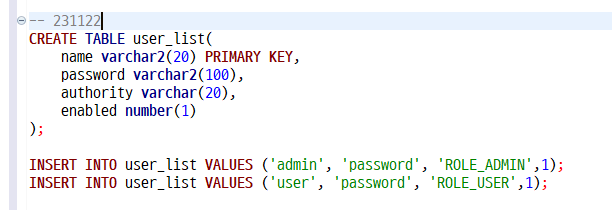
user_list 테이블을 생성한 뒤, admin과 user를 추가합니다. (password는 임시로 설정한 비밀번호)
3. Spring Security의 암호화
◼ org.springframwork.security.crypto.bcrypt.BCryptPasswordEncoder
: 스프링 시큐리티에서 기본적으로 사용한하는 암호화방식으로 암호화가 될때마다 새로운 값을 생성합니다. 임의적인 값을 추가해서 암호화하지 않아도 됩니다.
◼ org.springframework.security.crypto.password.StandardPasswordEncoder
: sha-256암호화를 사용합니다.
◼ org.srpringframework.security.cryto.password.NoOpPasswordEncoder
: 암호화를 사용하지 않을때 사용합니다.
1) 암호화 테스트
메인메서드는 잠시 주석처리하고, 1234를 암호화한 값을 콘솔창에 출력한다. 얻은 값으로 DB에 임시로 넣은 비밀번호를 변경해준다.
▶ UPDATE user_list SET password = '(콘솔창에서 얻은 암호화된 비밀번호값)';
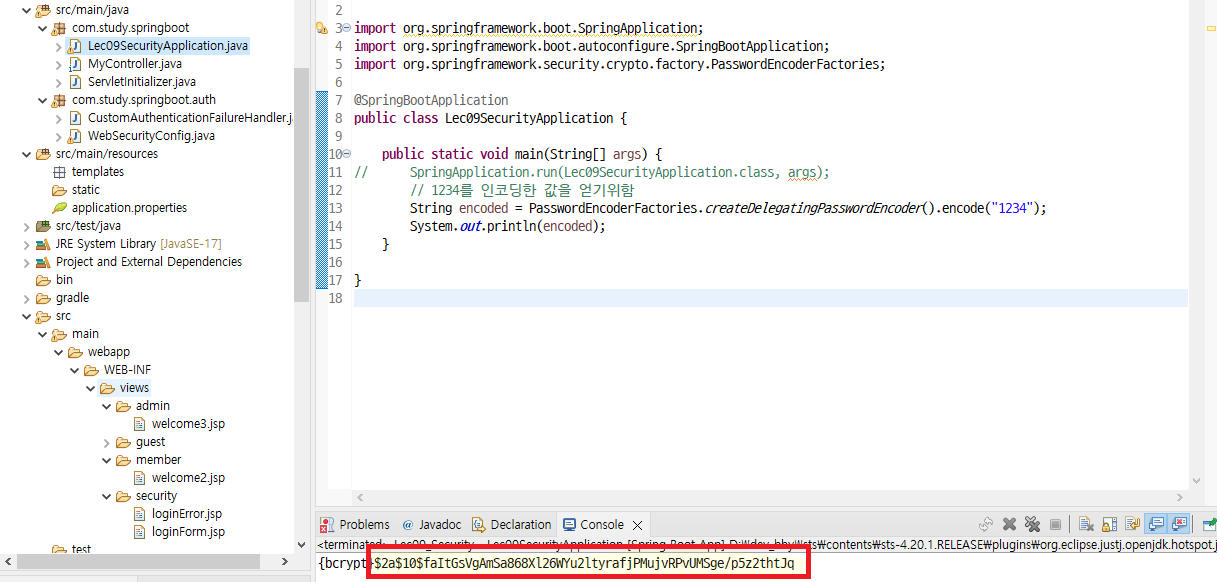
인코딩 과정을 지우고 주석처리했던 부분을 되돌린다.
@SpringBootApplication
public class Lec09SecurityApplication {

	public static void main(String[] args) {
		SpringApplication.run(Lec09SecurityApplication.class, args);
		// 1234를 인코딩한 값을 얻기위함
//		String encoded = PasswordEncoderFactories.createDelegatingPasswordEncoder().encode("1234");
//		System.out.println(encoded);
	}

}
2) [com.study.springboot.auth] WebSecurityConfig 수정
package com.study.springboot.auth;

import javax.sql.DataSource;

import org.springframework.beans.factory.annotation.Autowired;
import org.springframework.context.annotation.Bean;
import org.springframework.context.annotation.Configuration;
import org.springframework.security.config.annotation.authentication.builders.AuthenticationManagerBuilder;
import org.springframework.security.config.annotation.web.builders.HttpSecurity;
import org.springframework.security.crypto.bcrypt.BCryptPasswordEncoder;
import org.springframework.security.web.SecurityFilterChain;
import org.springframework.security.web.authentication.AuthenticationFailureHandler;

import jakarta.servlet.DispatcherType;

@Configuration
public class WebSecurityConfig {
	@Autowired
	public AuthenticationFailureHandler authenticationFailureHandler;

	@Bean
	public SecurityFilterChain filterChain(HttpSecurity http) throws Exception {
		http.csrf((csrf) -> csrf.disable())
			.cors((cors) -> cors.disable())
			.authorizeHttpRequests(request -> request
					.dispatcherTypeMatchers(DispatcherType.FORWARD).permitAll()
					.requestMatchers("/").permitAll()
					.requestMatchers("/css/**", "/js/**", "/img/**").permitAll()
					.requestMatchers("/guest/**").permitAll()
					.requestMatchers("/member/**").hasAnyRole("USER", "ADMIN")
					.requestMatchers("/admin/**").hasRole("ADMIN")
					.anyRequest().authenticated() // 어떠한 요청이라도 인증 필요
					);

		http.formLogin((formLogin) -> formLogin
				.loginPage("/loginForm")
				.loginProcessingUrl("/j_spring_security_check")
//				.failureUrl("/loginError") // 로그인 에러페이지로 이동
				.failureHandler(authenticationFailureHandler)
				.usernameParameter("j_username")
				.passwordParameter("j_password")
				.permitAll()
				);
		http.logout((logout) -> logout
				.logoutUrl("/logout")
				.logoutSuccessUrl("/")
				.permitAll()
				);

		return http.build();
	}
//	@Bean
//	public UserDetailsService userService() {
//		UserDetails user = User.builder()
//				.username("user")
//				.password(passwordEncoder().encode("1234"))
//				.roles("USER") // ROLE_USER 에서 ROLE_은 자동으로 붙음
//				.build();
//
//		UserDetails admin = User.builder()
//				.username("admin")
//				.password(passwordEncoder().encode("1234"))
//				.roles("USER","ADMIN")
//				.build();
//
//		return new InMemoryUserDetailsManager(user, admin);
//	}
//
//	private PasswordEncoder passwordEncoder() {
//		return PasswordEncoderFactories.createDelegatingPasswordEncoder();
//	}

	@Autowired
	private DataSource dataSource;

	@Autowired
	protected void configure(AuthenticationManagerBuilder auth) throws Exception {
		auth.jdbcAuthentication()
			.dataSource(dataSource)
			.usersByUsernameQuery("select name as userName, password, enabled "
					+ "from user_list where name=?")
			.authoritiesByUsernameQuery("select name as userName, authority "
					+ "from user_list where name=?")
			.passwordEncoder(new BCryptPasswordEncoder());
	}
}
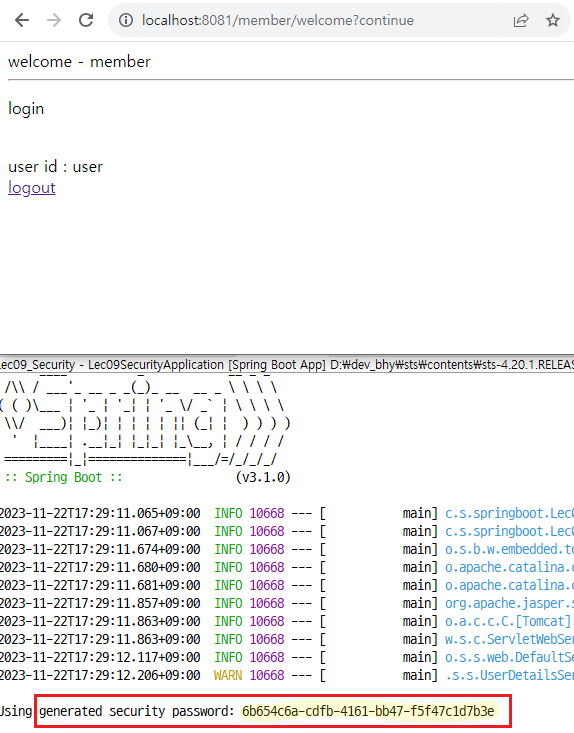
💻 구동 확인
'Framework > SpringBoot' 카테고리의 다른 글
| [Spring Boot] JPA 사용하기② (1) | 2023.11.23 |
|---|---|
| [Spring Boot] JPA 사용하기 (0) | 2023.11.22 |
| [Spring Boot] ①Security Status Check , ②Security taglib 사용하기 (1) | 2023.11.22 |
| [Spring Boot] Spring Security 적용하기 (2) | 2023.11.21 |
| [Spring Boot] Transaction 적용하기 (2) | 2023.11.20 |


